
ITMA 2019 – Official App6.6.1 - App Store
You'll be able to see results in few seconds.
Publisher Description


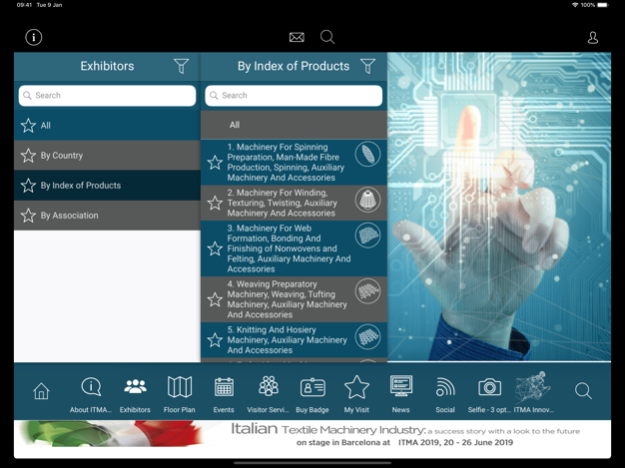
The official app for ITMA 2019, the world’s largest and most established textile and garment technology exhibition. The exhibition will be held from 20 to 26 June 2019 in Barcelona, Spain.
App features include :
- About ITMA 2019 – view key information about the show
- Exhibitors – search more than 1,600 exhibitors by exhibit chapter, country and locate them on the floorplan
- Floorplan – navigate your way around the show
- Buy Badge – cut on-site queue by purchasing your visitor badge
- My Visit – favourite exhibitors and events, take notes, and plan your route
- Appointment Scheduler – line up meetings with exhibitors before you arrive at the show
- Events – check out all show happenings, including conferences and forums
- News – read the latest event press releases
- Social – catch up on the latest ITMA 2019 social media posts
- Selfie – take selfies with special ITMA 2019 branding
About ITMA
ITMA is the trendsetting textile and garment technology platform where the industry converges every four years to explore fresh ideas, effective solutions and collaborative partnerships for business growth. Held every four years in Europe, it is owned by the European Committee of Textile Machinery Manufacturers (CEMATEX)
which comprises national textile machinery associations from Belgium, France, Germany, Italy, Netherlands, Spain, Sweden, Switzerland and the United Kingdom.
May 17, 2019
Version 6.6.1
2019 Version
Minor bug fix
About ITMA 2019 – Official App
The company that develops ITMA 2019 – Official App is ITMA Services SA. The latest version released by its developer is 6.6.1.
To install ITMA 2019 – Official App on your iOS device, just click the green Continue To App button above to start the installation process. The app is listed on our website since 2019-05-17 and was downloaded 0 times. We have already checked if the download link is safe, however for your own protection we recommend that you scan the downloaded app with your antivirus. Your antivirus may detect the ITMA 2019 – Official App as malware if the download link is broken.
How to install ITMA 2019 – Official App on your iOS device:
- Click on the Continue To App button on our website. This will redirect you to the App Store.
- Once the ITMA 2019 – Official App is shown in the iTunes listing of your iOS device, you can start its download and installation. Tap on the GET button to the right of the app to start downloading it.
- If you are not logged-in the iOS appstore app, you'll be prompted for your your Apple ID and/or password.
- After ITMA 2019 – Official App is downloaded, you'll see an INSTALL button to the right. Tap on it to start the actual installation of the iOS app.
- Once installation is finished you can tap on the OPEN button to start it. Its icon will also be added to your device home screen.
Program Details
System requirements
Download information
Pricing
Version History
version 6.6.1
posted on 2019-05-17
May 17, 2019
Version 6.6.1
2019 Version
Minor bug fix
Disclaimer
Official App Store Link
We do not host ITMA 2019 – Official App on our servers. We did not scan it for viruses, adware, spyware or other type of malware. This app is hosted by Apple and passed their terms and conditions to be listed there. We recommend caution when installing it.
The App Store link for ITMA 2019 – Official App is provided to you by apps112.com without any warranties, representations or guarantees of any kind, so access it at your own risk.
If you have questions regarding this particular app contact the publisher directly. For questions about the functionalities of apps112.com contact us.
